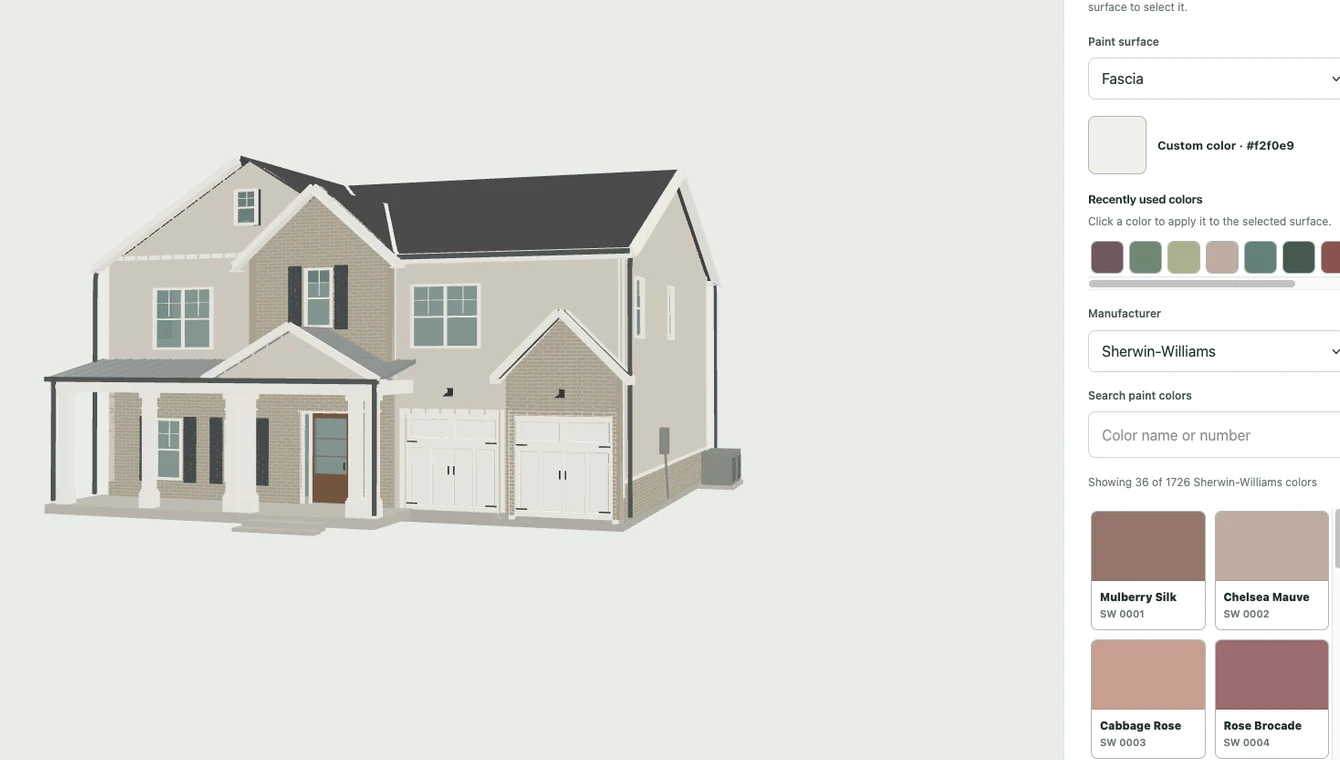
See how siding, trim, and door colors work together on your own home before you commit to paint.
A paintable 3D model of your home. Photo-based models are approximate.
YOUR HOME · EXTERIOR
Make the choice yours.
$4.99USD / home
One-time payment. No subscription.
One exterior 3D model of your home Prepared from your photos or blueprints and reviewed by our team.
180 days in your paint studio Your access starts when the model is approved.
Try colors across exterior surfaces Explore siding, trim, doors, and other paintable parts.
Save your favorite combinations Revisit and compare your options while studio access is active.
Download color sheets Keep your selections together to share with your painter.
Photorealistic previews of your final colors Includes 5 downloadable front-view previews using your saved colors and original photo or blueprint front elevation. See a before-and-after example.
You bring the home. We prepare the space to explore it.
01 / YOUR HOME
We handle the model.
Upload your source material. We prepare and review an exterior model so you can focus on the paint choices, without learning modeling software.
02 / YOUR OPTIONS
See the whole combination.
A color looks different alongside your trim and front door. Try combinations on your home’s model and keep the ones you like.
03 / YOUR DECISION
Keep everyone on the same page.
Finalize your colors and use the included front-view preview for your project. Compare before and after, download the preview and color sheets, and share them with your painter. Confirm colors with physical samples.
ONLY IF YOU NEED THEM
Optional extras. Upfront prices.
INTERIOR · BETA
Add the inside.
+$9.99 one time
$14.98 total for exterior + interior. Detailed blueprints required. Preparation and approval required; adding interior does not extend your existing studio access.
FRONT-PHOTO PREVIEWS
See another possibility.
$4.99 for 3 more
Your photo project includes 5 previews. Each additional generated image uses one credit; failed attempts return it. Viewing or downloading an existing result uses none. Packs apply to the same home and require active studio access; they do not extend it.
BEFORE YOU START
Know what to expect.
What happens after I pay?+
Upload your exterior photos or blueprints and submit your project. We prepare and review the model before opening your studio, then email you when it is ready. Preparation is not instant; review times vary.
Is this a 3D model or a painted photo?+
The exterior project includes an interactive 3D model, where you try colors on individual surfaces. Photo-based models approximate your home and may simplify hidden areas or small details. Each project also includes 5 paint previews from your original front photo or blueprint front elevation. This is a separate downloadable image and may alter details.
Do I pay each time I change a color?+
No. Changing colors and saving combinations in the 3D studio are included during your 180 days of access. Generating a new front-photo image uses a preview credit: 5 are included, with optional packs priced above.
What happens after 180 days?+
Your studio editing access ends. Your saved color records remain available from your account. There is no automatic subscription renewal.
Will the paint look exactly like the screen?+
No. Lighting, screens, and the model affect how colors look. Use Plan & Paint to narrow your choices, then confirm them with physical paint samples before ordering.
Try the controls before you commit.
Explore the sample house free. No account, card, or upload needed.