PLAN & PAINT · HOMEOWNER GUIDE
How to Preview Paint Colors Before Painting Your House
Start with the parts of your home that will stay the same, compare a few complete color combinations in a visualizer, then check physical samples on your house. A digital preview helps narrow the choices; the sample confirms the finish in real light.
1. List what is staying
Look at the roof, brick, stone, windows, and other finishes you are not replacing. Keep these in mind when choosing a main paint color. A color that looks good on an isolated swatch may feel different beside those fixed finishes.
2. Build three combinations
Choose a main siding color, a trim color, and an optional door accent for each combination. For example, compare a warm neutral with soft white trim, a muted green with cream trim, and a darker neutral with lighter trim. These are starting ideas, not matches to a specific house or paint product.
3. Preview the whole house
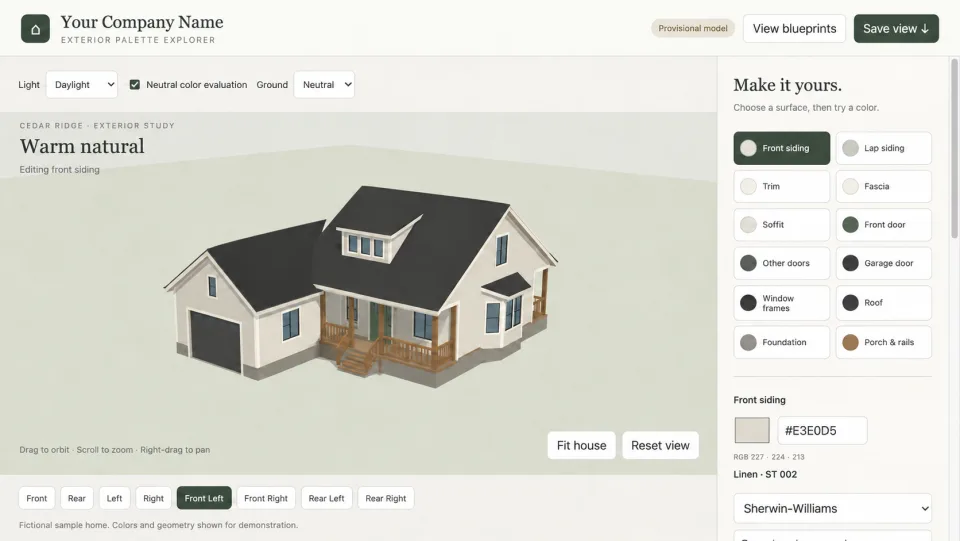
Use a model of your own home to compare how much area each color covers. Change one surface group at a time and save the combinations you like. Look from several angles; a small front-door accent and a large siding area have different visual effects.
4. See your final colors on your front photo
Choose “Photo generate” in the editor once you like your colors. Select your original front photo or, for a blueprint project, the PDF page showing the front elevation. Confirm your selection to use one rendering credit. Compare the before and after, then download your paint preview.


5 realistic front-view previews included with each homeowner project. Optional extras: 3 for $4.99.
Each new image uses one credit; failed attempts return it. Viewing and downloading saved images use none. Previews use your original front photo or blueprint front elevation and require active studio access. Extra packs apply to the same home and do not extend access. Confirm colors with physical paint samples.
5. Check samples outside
Use your shortlist to select physical paint samples. Follow the paint manufacturer’s sample and application instructions, and compare them beside the existing finishes at different times of day. Check the actual color name and product with your supplier rather than treating a screen image as a color specification.
6. Save the final choice
Keep a record of which color belongs on each surface. Plan & Paint can save combinations and create color sheets for discussion with your painter. Confirm product, sheen, preparation, and quantities with the person doing the work.
See how a photo-based home preview works, or try the demo house.